14.11.3.5. OpenScape 4000 Media Profile 


To configure the OpenScape 4000 Media Profile, proceed as follows:
- Go to OS SBC Management Portal > VOIP > Media.
Figure 333. Media profile
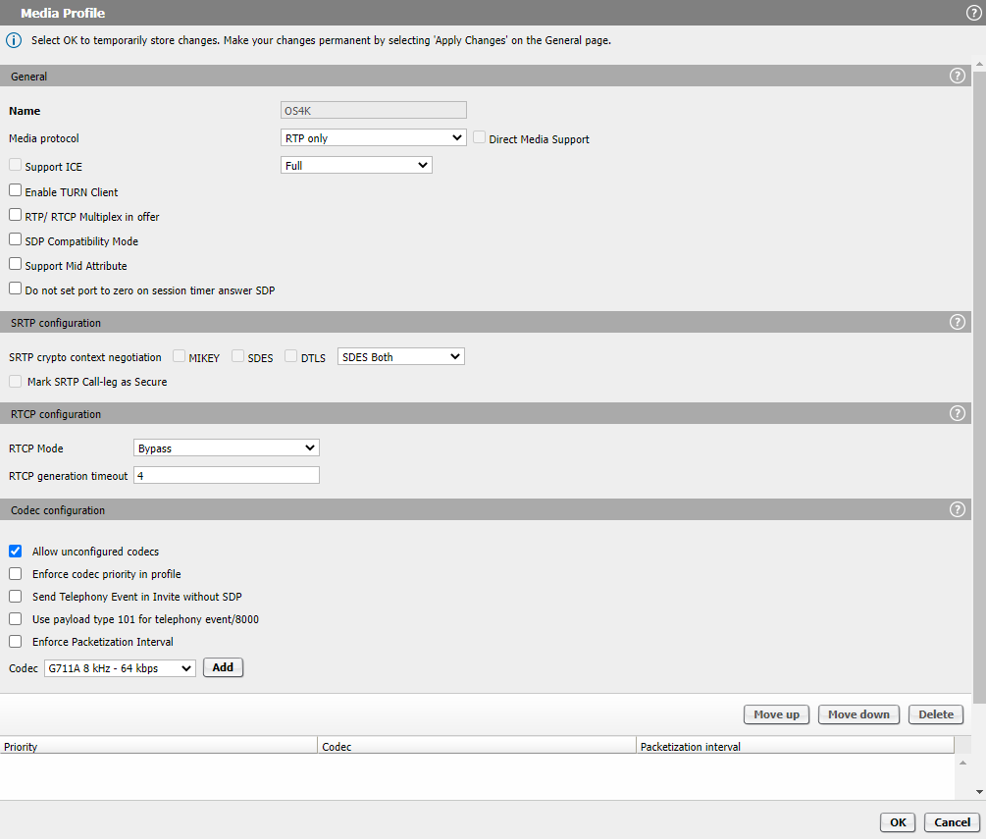
- In Media Profiles area, click the Add button to create the media
profile for OS SBC – OpenScape 4000 connection. The following parameters must be
configured:
- Name: OS4K (friendly name)
- Media protocol: RTP only
- RTP/RTCP Multiplex in offer: Unchecked
- Allow unconfigured codecs: Checked
- In the Media window, click the OK button.
- In the VOIP window, click the OK button.
- In the main OS SBC page, click the Apply Changes button.