14.11.3.4. Teams Media Profile 


The communication between Teams Phone System is secure with secure audio (SRTP).
To configure the Teams Media Profile, proceed as follows:
- Go to OS SBC Management Portal > VOIP > Media.
Figure 332. Media Profiles
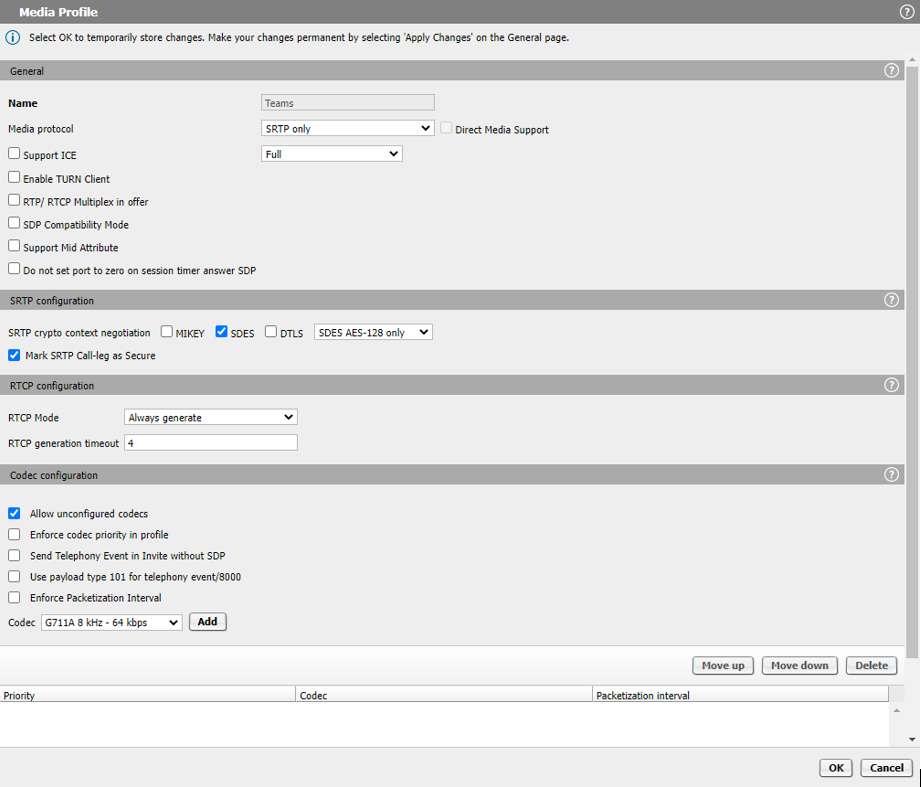
- In the Media Profiles area, click the Add button to create the media profile for
OS SBC - Teams connections. The following parameters must be entered:
- Name: Teams (friendly name)
- Media protocol: SRTP only
- Support ICE: Unchecked (for MB = OFF case)
- SRTP crypto context negotiation: SDES
- Mark SRTP Call-legasSecure: Checked
- rtcpMode: Bypass or Always Generate
- Allow unconfigured codecs: Checked
- In the Media window, click the OK button.
- In the VOIP window, click the OK button.
- In the main OS SBC page, click the Apply Changes button.