16.3.2.2. Configure OpenScape 4000 


Configure the email address
An Unify Phone client will register in the OpenScape 4000 system as an UFIP SIP
device that is further linked to a desk device. This desk device defines the
E164 number of the Unify Phone user but it is not mandatory that the desk device
is in service.
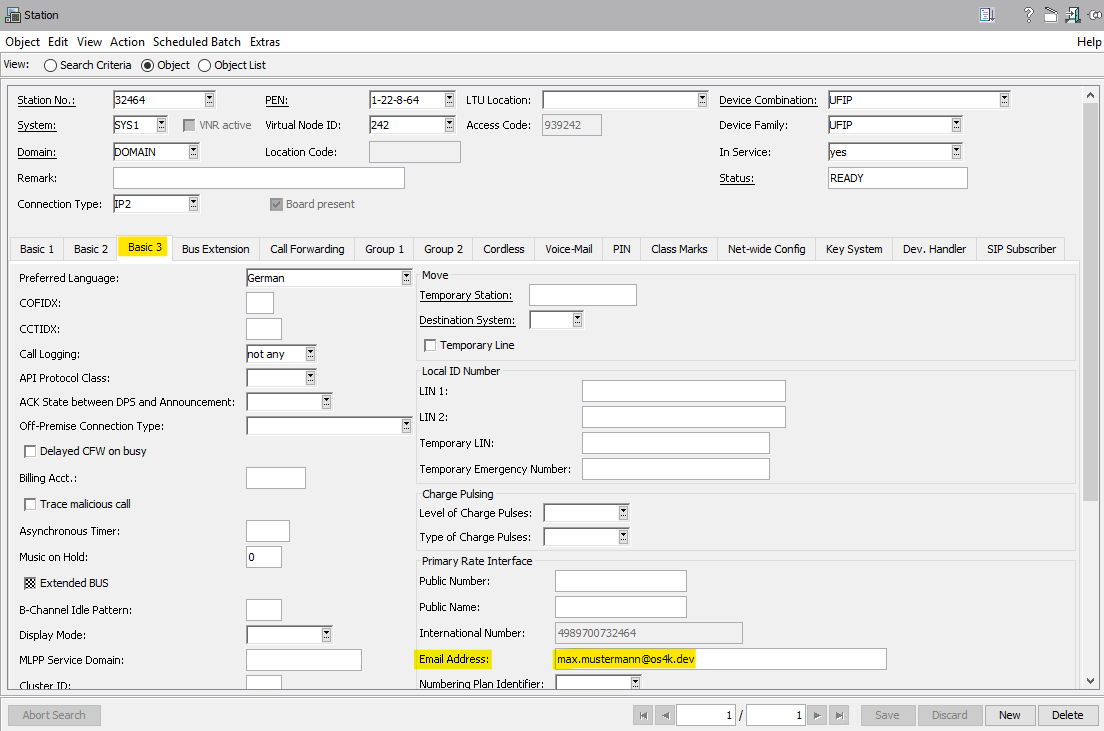
The email address of the Unify Phone user must be configured in OpenScape 4000
(at the desk device) in the Configuration Management. Currently, this
configuration is not possible via AMO.
To configure the email address, navigate to Configuration Management >
Station and add the email address in the Basic 3 tab.
Figure 363. Add the email address
INFO:
If multiple email addresses need to be configured, use the Circuit mass
migration csv import. For more information, refer to Mass migration from Circuit.
Configure an auxiliary device
Each Unify Phone client (e.g. OSMO and Circuit clients) will register in
OpenScape 4000 as an UFIP SIP device. This auxiliary device must be linked to
user's desk device via the CLNTDESK parameter. Additionally, it must be marked
as an Unify Phone device via the CLNTTYPE=UNIPHONE parameter.
Auxiliary devices configured with CLNTTYPE=UNIPHONE must have a Unify Phone
license. Without such a license, any registration from the Unify Phone client
will be rejected.
The auxiliary device can be configured using:
- The AMO-SBCSU
command:
ADD-SBCSU:STNO=<UFIP_STN>, OPT=OPTI, CONN=IP2, PEN=<X-Y-Z-T>, DVCFIG=UFIP, IPPASSW=..., USERID=..., SECZONE=..., CLNTDESK=<DESK_STN>, CLNTTYPE=UNIPHONE;
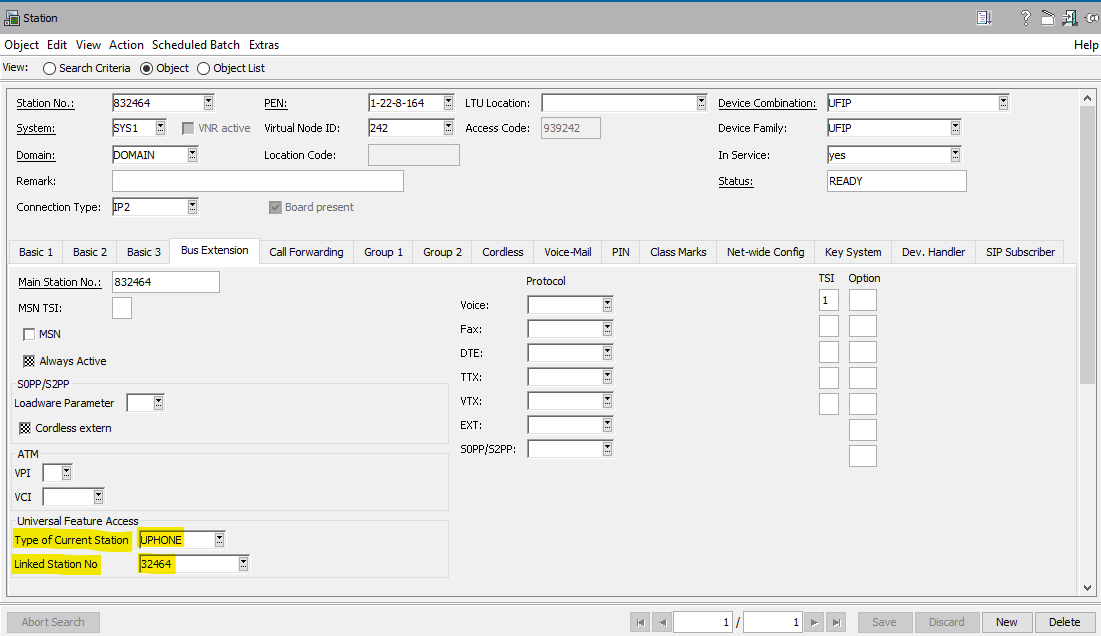
- The OpenScape 4000 Assistant or Manager, by navigating to Configuration
Management > Station > Bus Extension tab and
configuring the Universal Feature Access section, as displayed in the
image below:
Figure 364. Bus Extension
To check the linkage, use DIS-SBCSU:
- DIS-SBCSU for UFIP_STN will show DESK=<DESK_STN>
- DIS-SBCSU for DESK_STN will show CLIENT=<UFIP_STN>
or
- The WBM of the Gateway, where UFIP_STN is configured under Configuration
> Voice Gateway > Clients > UFIP SIP:
-
The Station Number column will show <UFIP_STN>.
-
The ONS Number column will show DESK_STN.
-
Synchronize data between Unify Phone Telephony Connector and OpenScape 4000
The configuration in OpenScape 4000 can be synchronized with Unify Phone
Telephony Connector periodically (e.g. every 5h). During the synchronization
process, the OpenScape 4000 will retrieve changes from the Unify Video side
(e.g. new users) and upload the configuration data (e.g. phone number and SIP
credentials) to Unify Phone Telephony Connector. When you have configured some
new Unify Phone users in OpenScape 4000, you can also start the synchronization
process immediately.
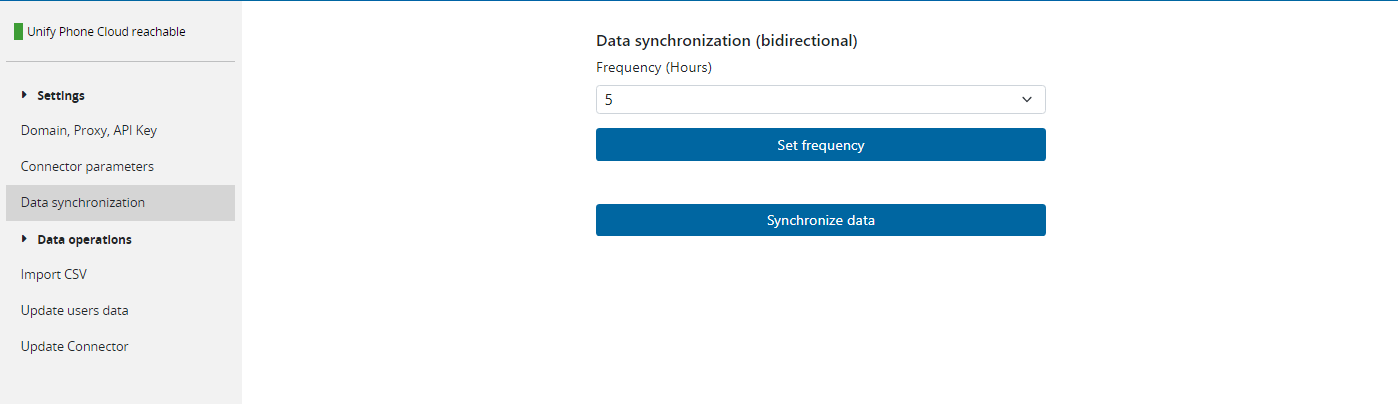
To synchronize the configuration, navigate to Configuration Management >
Unify Phone, select Data synchronization frequency and click
Synchronize Data
Figure 365. Data synchronization
You can check the configuration under the Update users data section, as
displayed in the figure below.
Figure 366. Update users data
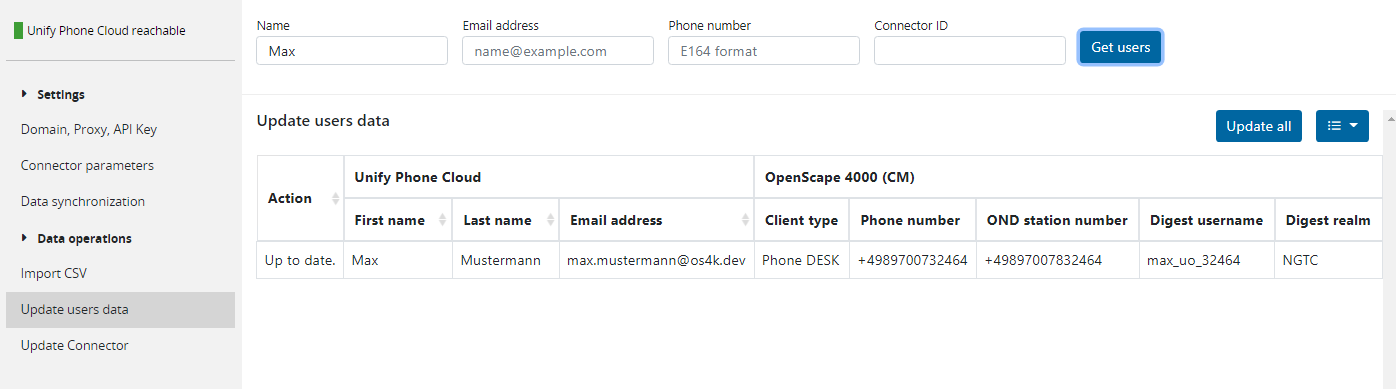
The Action column displays the current state of the configuration and
synchronization.
- Up to date: the data is already synchronized with Unify Phone Telephony Connector.
- Update: the changes were made on OpenScape 4000 and are not synchronized yet. You can press the update button to synchronize them now.
- E-Mail not configured in OS4K: the Unify Video user has no
corresponding email address configured in OpenScape 4000.
INFO:
This message is also displayed when the user is configured on another PBX. - Unify Phone not configured in OS4K: The Unify Video user has an email address configured in OpenScape 4000, but the auxiliary device is not configured or it has the wrong Client type assigned.