5.21.2.1.4. Mixed-numbered network with digital ISDN trunk access
points 


In this example (Figure 53),
the network consists of a closed-numbered area in Berlin and an open-numbered
node in Munich with digital trunk access points.
In the ISDN numbering plan, the format-dependent number modification
that can be configured using AMO KNDEF, AMO KNFOR, and AMO KNPRE is selected.
For the open numbering in the OpenScape 4000 internal numbering plan
UNKNOWN, the number modification must be set with AMO KNMAT.
Figure 51. Example: Mixed-numbered network with digital ISDN trunk access points
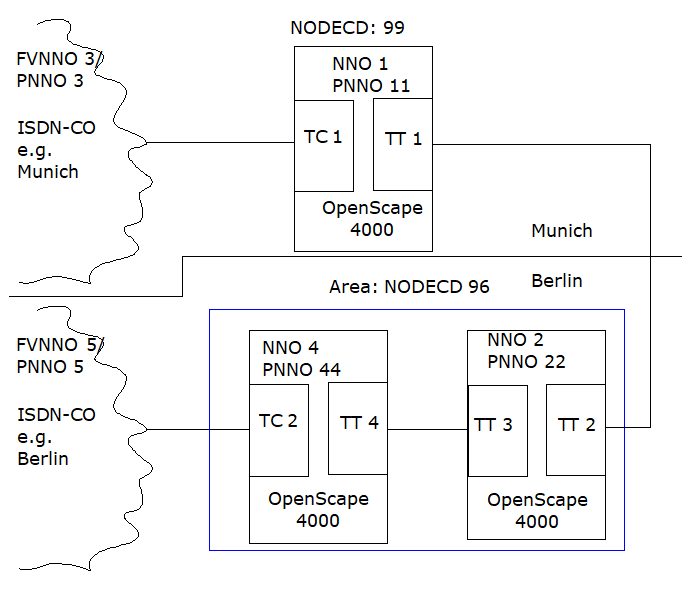
Configuration in physical node 11
Trunk calls to Berlin should not already be routed to the central
office in Munich, but rather via the tie line to Berlin.
Since ISDN connections can also come in via the tie trunk during transit,
you must make the ISDN-specific settings here as well.
You can configure the node with PNNO=11 as follows:
- Set the node table:
ADD-KNDEF:NNO=1,TYPE=OWN,ISDNCC=49,ISDNAC=89,
ISDNLC=722,ISDNSK=3,ISDNUL=EXT,NODECD=99;

CHANGE-KNDEF:NNO=1,DFLT=Y;
- Set the own node code in the WABE:
ADD-WABE:CD=99,DAR=OWNNODE;
- Set the node prefix table:
ADD-KNPRE:DPLN=0,NPI=ISDN,TON=INTERNAT,EXIT=0,PREFIX=00;

ADD-KNPRE:DPLN=0,NPI=ISDN,TON=NATIONAL,EXIT=0,PREFIX=0;

ADD-KNPRE:DPLN=0,NPI=ISDN,TON=SUBSCR,EXIT=0;
- Set the central system data:
CHANGE-ZAND:TYPE=ALLDATA,PNNO=11, PNODECD=888811;
- Set the digital trunk circuit TC1 (important parameter):
ADD-BUEND:NO=30,TGRP:=44;

ADD-TDCSU:OPT=NEW,DEV=VCCOD,BCGR=1,COTNO=11,COPNO=2,
TGRP=44,LCOSV=1, LCOSD=1,PROTVAR=EDSGER,NNO=3,ISDNIP=00,
ISDNNP=0;
- Set the digital tie trunk TT1 (important parameter):
The node number does not have to be specified since it is transferred in this protocol.
ADD-BUEND:NO=30,TGRP=55;

ADD-TDCSU:OPT=NEW,DEV=S2CONN,BCGR=1,COTNO=11,COPNO=2,
TGRP=55,LCOSV=1, LCOSD=1,PROTVAR=ECMA1;
- LCR route configuration:
With AMO RICHT, you can set up LCR routes for the central office and tie line according to the LCR description.
ADD-RICHT:MODE=LRTENEW,LRTE=700,LSVC=ALL,TGRP=44,DNNO=3; /*
CO */

ADD-RICHT:MODE=LRTENEW,LRTE=701,LSVC=ALL,TGRP=55,DNNO=5; /*
Central office over tie line */

ADD-RICHT:MODE=LRTENEW,LRTE=702,LSVC=ALL,TGRP=55,DNNO=5; /*
Central office over tie line */

ADD-RICHT:MODE=LRTENEW,LRTE=711,LSVC=ALL,TGRP=55,DNNO=2; /*
TIE */
With AMO LODR, you can configure outdial rules for CO and tie line connections. Outdial rule 10 is applied to international numbers in tie line traffic, outdial rule 11 to national numbers in tie line traffic, and outdial rule 12 to direct CO traffic. Outdial rule 13 is intended for pure tie line traffic. The NPI numbering plan, which is always determined from the LCR, is important for the modification of the calling number. The TON is used only for the called number.ADD-LODR:ODR=10,INFO="CO OVER TIE LINE INTERNAT."; ADD-LODR:ODR=10,CMD=ECHO,FIELD=3; ADD-LODR:ODR=10,CMD=ECHO,FIELD=4; ADD-LODR:ODR=10,CMD=NPI,NPI=ISDN; ADD-LODR:ODR=10,CMD=TON,TON=INTERNAT; ADD-LODR:ODR=10,CMD=END; ADD-LODR:ODR=11,INFO="CO OVER TIE LINE NAT."; ADD-LODR:ODR=11,CMD=ECHO,FIELD=3; ADD-LODR:ODR=11,CMD=ECHO,FIELD=4; ADD-LODR:ODR=11,CMD=NPI,NPI=ISDN; ADD-LODR:ODR=11,CMD=TON,TON=NATIONAL; ADD-LODR:ODR=11,CMD=END; ADD-LODR:ODR=12,INFO="CO"; ADD-LODR:ODR=12,CMD=ECHO,FIELD=2; ADD-LODR:ODR=12,CMD=NPI,NPI=ISDN; ADD-LODR:ODR=12,CMD=TON,TON=UNKNOWN; ADD-LODR:ODR=12,CMD=END; ADD-LODR:ODR=13,INFO="TIE"; ADD-LODR:ODR=13,CMD=ECHO,FIELD=1; ADD-LODR:ODR=13,CMD=ECHO,FIELD=2; ADD-LODR:ODR=13,CMD=END;
The outdial rules are assigned to the route elements with AMO LDAT.ADD-LDAT:LROUTE=700,LSVC=ALL,LVAL=1,TGRP=44,ODR=12,LAUTH=1; ADD-LDAT:LROUTE=701,LSVC=ALL,LVAL=1,TGRP=55,ODR=10,LAUTH=1; ADD-LDAT:LROUTE=702,LSVC=ALL,LVAL=1,TGRP=55,ODR=11,LAUTH=1; ADD-LDAT:LROUTE=711,LSVC=ALL,LVAL=1,TGRP=55,ODR=13,LAUTH=1;
With AMO LDPLN, enter the route elements into the dial pattern plan:ADD-LDPLN:LDP=0-X,DPLN=0,LROUTE=700,LAUTH=1;/* Central office */ ADD-LDPLN:LDP=0-00-4930-X,DPLN=0,LRTE=701,LAUTH=1;/* Central office over tie line internat. */ ADD-LDPLN:LDP=0-0-30-X,DPLN=0,LROUTE=702,LAUTH=1; /* Central office over tie line national */ ADD-LDPLN:LDP=96-X,DPLN=0,LROUTE=711,LAUTH=1; /* TIE */
- Set the node format table:
The node format table can be set as described in Section .
- Set the node connection matrix:
For the ISDN numbering plan, format-dependent number modification was selected in this example. The node connection matrix can thus not be set for NPI=ISDN.For the UNKNOWN numbering plan (i.e. the OpenScape 4000 specific numbering plan), the modifications must be configured for open numbering. Using AMO KNMAT, you must thus set the matrix in such a way that the outgoing calling number is always supplemented with the own node code. In case of incoming connections that end at Node 1, the number is shortened by its own node code.
CHANGE-KNMAT:NPI=UNKNOWN,LEVEL=0,ONNOL=OWN,DNNOL=ROW,
NUMEXT=#####;

CHANGE-KNMAT:NPI=UNKNOWN,LEVEL=0,ONNOL=ROW,DNNOL=OWN,
NUMRED=#####;
The following setting results:------------------------------------------------------------- NODE MATRIX FOR NPI = UNKNOWN, LEVEL = 0, OWN NNO = 1 ------------------------------------------------------------- ONNO |DNNO |CONN|MODCON| NUMEXT | NUMRED / ONNOL|/ DNNOL| | | | ------+------+----+------+------------------------+---------- 1 |ROW | A |ALL | 99 | - ------+------+----+------+------------------------+---------- ROW | 1 | A |ALL | - | 99
Configuration in physical node 22
Trunk calls to Munich should not already be routed to the central
office in Berlin, but rather via the tie line to Munich.
Since ISDN connections can also come in via the tie trunk during transit,
you must make the ISDN-specific settings here as well.
Configure the virtual node with PNNO=2 as follows:
- Set the node table:
ADD-KNDEF:NNO=2,TYPE=OWN,ISDNCC=49,ISDNAC=30,
ISDNLC=611,ISDNSK=3,ISDNUL=EXT,NODECD=96;NODECDSK=2;

CHANGE-KNDEF:NNO=2,DFLT=Y;
- Set the own area code in WABE:
ADD-WABE:CD=96,DAR=OWNNODE;
- Set the node prefix table:
ADD-KNPRE:DPLN=0,NPI=ISDN,TON=INTERNAT,EXIT=0,PREFIX=00;

ADD-KNPRE:DPLN=0,NPI=ISDN,TON=NATIONAL,EXIT=0,PREFIX=0;

ADD-KNPRE:DPLN=0,NPI=ISDN,TON=SUBSCR,EXIT=0;
- Set the central system data:
CHANGE-ZAND:TYPE=ALLDATA,PNNO=22, PNODECD=888822;
- Set the digital tie trunk TT2 (TGRP=55), TT3 (TGRP=66):
The node number does not have to be specified since it is transferred in this protocol.
ADD-BUEND:NO=30,TGRP=55;

ADD-BUEND:NO=30,TGRP=66;

ADD-TDCSU:OPT=NEW,DEV=S2CONN,BCGR=1,COTNO=11,COPNO=2,TGRP=55,
LCOSV=1, LCOSD=1,PROTVAR=ECMA1; /* most important parameter */

ADD-TDCSU:OPT=NEW,DEV=S2CONN,BCGR=1,COTNO=11,COPNO=2,TGRP=66,
LCOSV=1, LCOSD=1,PROTVAR=ECMA1; /* most important parameter */
- LCR route configuration:
With AMO RICHT, you can set up LCR routes for the central office and tie line according to the LCR description.
ADD-RICHT:MODE=LRTENEW,LRTE=700,LSVC=ALL,TGRP=66,DNNO=5;
/* CO */

ADD-RICHT:MODE=LRTENEW,LRTE=701,LSVC=ALL,TGRP=55,DNNO=3;
/* CO OVER TIE*/

ADD-RICHT:MODE=LRTENEW,LRTE=702,LSVC=ALL,TGRP=55,DNNO=3;
/* CO OVER TIE*/

ADD-RICHT:MODE=LRTENEW,LRTE=711,LSVC=ALL,TGRP=55,DNNO=1;
/* TIE */
With AMO LODR, you can configure outdial rules for CO and tie line connections. Configure the outdial rules with AMO LODR in the exact same manner as in Node 1 (outdial rules 10 to 13 in the example). Only the outdial rule for digit pattern 0-X changes:ADD-LODR:ODR=12,CMD=ECHO,FIELD=1;/* transfer 0 */ ADD-LODR:ODR=12,CMD=ECHO,FIELD=2; ADD-LODR:ODR=12,CMD=NPI,NPI=ISDN; ADD-LODR:ODR=12,CMD=TON,TON=UNKNOWN; ADD-LODR:ODR=12,CMD=END;
The outdial rule is assigned to the route elements using AMO LDAT.ADD-LDAT:LROUTE=700,LSVC=ALL,LVAL=1,TGRP=66,ODR=12,LAUTH=1; ADD-LDAT:LROUTE=701,LSVC=ALL,LVAL=1,TGRP=55,ODR=10,LAUTH=1; ADD-LDAT:LROUTE=702,LSVC=ALL,LVAL=1,TGRP=55,ODR=11,LAUTH=1; ADD-LDAT:LROUTE=711,LSVC=ALL,LVAL=1,TGRP=55,ODR=13,LAUTH=1;
With AMO LDPLN, enter the route elements into the dial pattern plan:ADD-LDPLN:LDP=0-X,DPLN=0,LROUTE=700,LAUTH=1; /* CO */ ADD-LDPLN:LDP=0-00-4989-X,DPLN=0,LROUTE=701,LAUTH=1; /* Central office over tie line internat. */ ADD-LDPLN:LDP=0-0-89-X,DPLN=0,LROUTE=702,LAUTH=1; /* Central office over tie line national */ ADD-LDPLN:LDP=99-X,DPLN=0,LROUTE=711,LAUTH=1; /* TIE */
- Set the node format table:
The node format table can be set as described in Section .
- Set the node connection matrix:
Analogous to virtual node 1, you can configure virtual node 2 for open numbering in the OpenScape 4000 numbering plan. Instead of the node code, enter area code 96:
CHANGE-KNMAT:NPI=UNKNOWN,LEVEL=0,ONNOL=OWN,DNNOL=ROW,NUMEXT=#####; CHANGE-KNMAT:NPI=UNKNOWN,LEVEL=0,ONNOL=ROW,DNNOL=OWN,NUMRED=#####;
The following setting results:--------------------------------------------------------------------------- NODE MATRIX FOR NPI = UNKNOWN, LEVEL = 0, OWN NNO = 2 --------------------------------------------------------------------------- ONNO |DNNO |CONN|MODCON| NUMEXT | NUMRED / ONNOL|/ DNNOL| | | | ------+------+----+------+------------------------+------------------------ 2 |ROW | A |ALL | 96 | - ------+------+----+------+------------------------+------------------------ ROW | 2 | A |ALL | - | 96
Configuration in physical node 44
- Set the node table:
ADD-KNDEF:NNO=4,TYPE=OWN,ISDNCC=49,ISDNAC=30,ISDNLC=611,ISDNSK=3, ISDNUL=EXT,NODECD=96;NODECDSK=2; CHANGE-KNDEF:NNO=4,DFLT=Y;
- Set the own area code in WABE:
ADD-WABE:CD=96,DAR=OWNNODE;
- Set the node prefix table:
ADD-KNPRE:DPLN=0,NPI=ISDN,TON=INTERNAT,EXIT=0,PREFIX=00; ADD-KNPRE:DPLN=0,NPI=ISDN,TON=NATIONAL,EXIT=0,PREFIX=0; ADD-KNPRE:DPLN=0,NPI=ISDN,TON=SUBSCR,EXIT=0;
- Set the central system data:
CHANGE-ZAND:TYPE=ALLDATA,PNNO=44, PNODECD=888844;
- Set the digital trunk circuit TC2:
ADD-BUEND:NO=30,TGRP=44; ADD-TDCSU:OPT=NEW,DEV=VCCOD,BCGR=1,COTNO=11,COPNO=2,TGRP=44, LCOSV=1, LCOSD=1,PROTVAR=EDSGER,NNO=5,ISDNIP=00,ISDNNP=0;
- Set the digital tie trunk TT4:
Since ISDN connections can also come in via the tie trunk during transit, you must make the ISDN-specific settings here as well. The node number does not have to be specified since it is transferred in this protocol.
ADD-BUEND:NO=30,TGRP=66; ADD-TDCSU:OPT=NEW,DEV=S2CONN,BCGR=1,COTNO=11,COPNO=2,TGRP=66, LCOSV=1,LCOSD=1,PROTVAR=ECMA1;
- LCR route configuration:
With AMO RICHT, you can set the LCR routes according to the LCR description in the same manner as virtual node 2 for the central office and the tie line.With AMO LODR, you can configure outdial rules for CO and tie line connections. Configure the outdial rules with AMO LODR in the exact same manner as in Node 1 (outdial rules 10 to 13 in the example).Using AMO LDAT, you can assign the outdial rules to the route elements as shown in Node 1.With AMO LDPLN, enter the route elements into the dial pattern plan:
ADD-LDPLN:LDP=0-X,DPLN=0,LROUTE=700,LAUTH=1; /* CO */

ADD-LDPLN:LDP=0-00-4989-X,DPLN=0,LROUTE=701,LAUTH=1; /*
Central office over tie line internat. */

ADD-LDPLN:LDP=0-0-89-X,DPLN=0,LROUTE=702,LAUTH=1; /* Central
office over tie line national */

ADD-LDPLN:LDP=99-X,DPLN=0,LROUTE=711,LAUTH=1; /* TIE */
- Set the node format table:
The node format table can be set as described in Section .
- Set the node connection matrix:
Analogous to Node 1, you can configure Node 2 for open numbering in the OpenScape 4000 numbering plan. Instead of the node code, enter area code 96:
CHANGE-KNMAT:NPI=UNKNOWN,LEVEL=0,ONNOL=OWN,
DNNOL=ROW,NUMEXT=96;

CHANGE-KNMAT:NPI=UNKNOWN,LEVEL=0,ONNOL=ROW,
DNNOL=OWN,NUMRED=96;
The following setting results:--------------------------------------------------------------------------- NODE MATRIX FOR NPI = UNKNOWN, LEVEL = 0, OWN NNO = 4 --------------------------------------------------------------------------- ONNO |DNNO |CONN |MODCON| NUMEXT | NUMRED / ONNOL|/ DNNOL| | | | -------+-------+-----+------+------------------------+------------------------ 4 |ROW | A |ALL | 96 | - -------+-------+-----+------+------------------------+------------------------ ROW | 4 | A |ALL | - | 96