10.26.7. E-mail notification of system errors 


Starting with the introduction of the new F2757 alarm which allows
to send a notification every time an emergency call has been initiated,
a new notification mechanism has been introduced.
This feature uses the SNMP service, which needs to be enabled in the
Assistant. To enable the SNMP/SMTP service you need to navigate to Application
Control.
By enabling the SNMP service, you can access SNMP/SMTP Configurator
page, under Diagnostics/Fault Management/SNMP/SMTP Configurator. Here,
in addition to the old configuration, a new SMTP entry has been added.
INFO:
Before configuring the SMTP notification mechanism, please note
that all the alarms are enabled by default. The system generates some
of the alarms several times a minute, therefore a flood of messages may
occur. This may result in restrictions on the email server/provider.
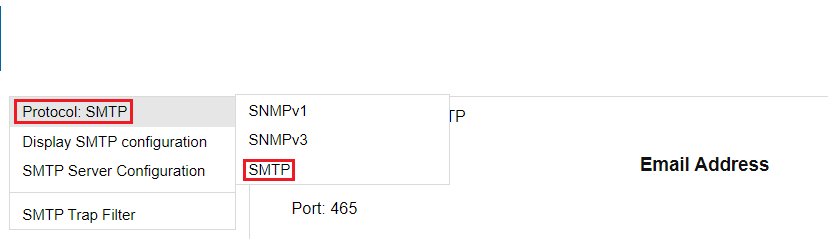
Figure 104. SMTP Server
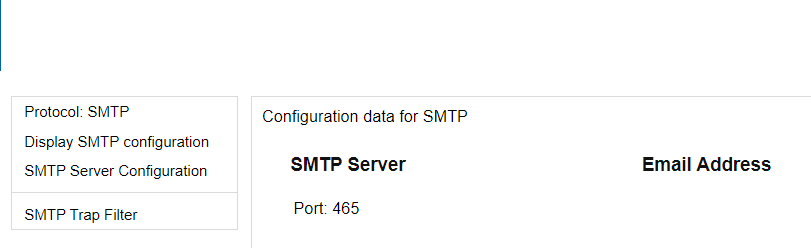
If the SMTP protocol is selected, the menu box displays specific items,
and the configurator allows to:
- Display the existing configuration (SMTP Server, Email Address);
- Specify all needed information for sending an e-mail when a specific alarm occurs;
- Test the email settings by sending a test email using the saved configuration;
- Configure a trap filter to enable/disable the alarms for which the e-mails are sent;
- Reset the configuration to the default values. This will result in no information for the SMTP Server and Email Address. Additionally, all available alarms are enabled.
To use the notification mechanism, an email server is needed which should
be accessible for the Assistant.
For configuration select the SMTP protocol, then select in the left
menu the SMTP Server Configuration.
Figure 105. SNMP/SMTP Configurator